Business tips
6
min read


In the world of social media, staying relevant and engaging with your audience is essential for any tech company. One effective strategy that many brands, including tech giants, employ is "trendjacking." This approach involves capitalizing on existing trending topics to boost social media presence and reach a wider audience.
So, how do you hijack a trend efficiently? Let's get into it!
Trendjacking is a social media strategy that revolves around capitalizing on existing trends, discussions, or viral moments rather than attempting to create entirely new viral content from scratch. The benefits are clear: it saves time and money and takes less creative juice to adapt your content to various trending topics. And what’s more, you can make your brand part of ongoing conversations and engage with a broader audience.
Some content types work exceptionally well within the trendjacking framework.
According to research, traditional marketing graphics have roughly 5% engagement on Instagram and Facebook. For memes, this number is 60%. Quite an incentive to incorporate memes into your marketing strategy, isn't it?

Memes are a huge part of internet culture. By using them, tech companies can instantly resonate with a broader and younger audience. When a tech company cleverly integrates a trending meme into its content, it shows a deep understanding of internet culture and can help humanize the brand.
If you haven't lived under a rock in the summer of 2023, you definitely have seen numerous Barbie/Oppenheimer/Barbenheimer memes. Lots of companies jumped on the bandwagon. So, on the one hand, social media was frankly oversaturated with the related content. But on the other, it still immediately caught the attention and invoked a (mostly) positive reaction.

AKA newsjacking. Sharing and commenting on breaking news is an excellent way to position your tech company as an industry authority. This not only keeps your audience informed but also establishes your brand as a trusted source of relevant information.
Spotlighting industry news, often with memes or in an otherwise humorous way, is a great way to become immediately relevant, get engagement on social media, and boost visibility.
For example, Duolingo capitalized on the news that Netflix is rolling out a way to curb the practice of sharing an account password outside the household, which costs the company quite a lot of money. The audience, let's say it mildly, was not happy with the news, which made the Duolingo response relevant and funny.

Crafting content tied to specific seasons, holidays, or local festivals can create a sense of community and relevance. Whether it's creating holiday-themed graphics, running seasonal promotions, or sharing festive messages, embracing the spirit of the season can foster a stronger emotional connection with your followers.
Sales, giveaways, and competitions are a great way to celebrate the upcoming holidays. However, there are also even more budget-friendly ways to celebrate with your audience. For example, Netflix crafted a Halloween playlist to accompany their holiday-specific movie lists.

Reacting to trending topics tied to current events, popular culture, or trending memes can demonstrate your brand's agility and awareness. By staying in tune with what's happening on social media and promptly joining relevant conversations, tech companies can showcase their ability to adapt and engage with their audience's interests. Quick and witty responses can be particularly effective in humanizing the brand and generating positive sentiment among followers — a tactic that also strengthens personal branding social media.
In winter-spring 2023, 'The Last of Us' was one of the most popular and talked-about shows. Hootsuite used viral images from it to capitalize on the pain points of its target audience and make itself feel relatable.

As you can see, more often than not, all types of trendjacking involve quite a lot of humor – even in the B2B segment, which makes it a powerful tool in B2B social media marketing. As long as you stay on-brand and sensitive, that's a great way to engage with your audience and humanize your brand.
So, now that you have an idea of what trendjacking is and how it might look let's move on to another vital question: how do you do it?
To implement this strategy successfully, you need to keep a close eye on trending topics. Let's start with the most obvious first step:
First of all, there's a point in following breaking news across various outlets. You can subscribe to Google News notifications, follow BBC Breaking News on X (Twitter), use the Breaking News app on Google Play, and so on.
Google Trends is also a powerful tool to keep up with the latest events and react if you need to do some trendjacking ASAP. It also allows you to check the popularity of a topic over time. This way, you can discard topics that are not actually trending anymore.
.webp)
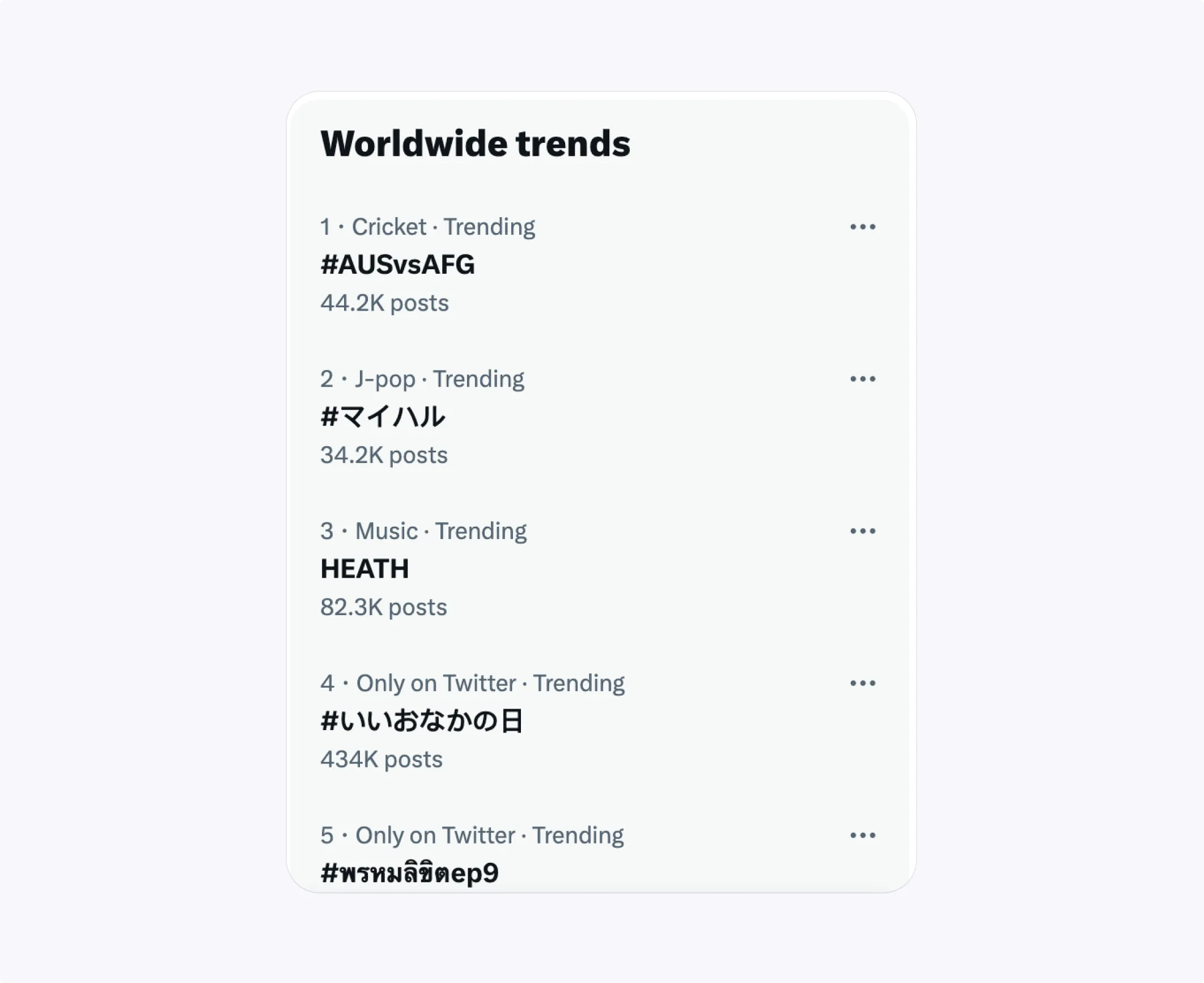
On X (Twitter), the "Trends" panel is your best friend — it’s also a core tactic for how to grow on Twitter. Follow the hashtags relevant to your industry, and remember, there are recurring trends and tags (for example, #ThrowbackThursday) you can use. The "Explore" page will also come in handy when you want to do some research.
Reddit is another place to look for trending topics and viral memes. It is a valuable platform for trendjacking, offering a unique and diverse ecosystem of subreddit communities. Subreddits can be a goldmine for staying informed about the latest news and engaging in discussions, and they can also help you get more social media followers. Subreddits like r/trending, r/popular, and r/all are excellent places to discover what's currently popular on the platform.
.webp)
If you want to automate your work, you can check out tools like Hashtagify, Hubspot Social Media Monitoring, the Google Plus API, and many others.
So, you've found a trending topic you want to use for your marketing. What's next?
There are some important tips you should keep in mind when trying to ride a wave of a trend effectively while respecting the boundaries of online discourse.
Stay relevant
Ensure that the trending topic you capitalize on aligns with your brand's values, target audience, and industry. Your content should feel natural within the context of the trend and not forced or opportunistic.
Mind your authenticity
Your content should feel genuine and in line with your brand's personality. Avoid coming across as overly promotional or insincere. Instead, aim for authenticity that resonates with your audience.
.webp)
Be on time
The speed at which you engage with trending topics can significantly impact your success. Be prompt in responding to trends, especially those tied to current events or pop culture, as they may (and more often than not will) have a short lifespan — and this also connects to knowing how often should you post.
Add value
Whether you share insights, humor, or information, your content should deliver value to the conversation, and make people want to click to tweet. Strive to educate, entertain, or inspire your audience.
Be sensitive about news
When trendjacking current events or news topics, be sensitive to the nature of the issue. Avoid exploiting tragedies or sensitive topics for self-promotion. Show empathy and respect in your responses.
Don't overdo it
While trendjacking is a valuable strategy, overusing it can dilute your brand's authenticity. Balance your content strategy with a mix of original, evergreen, and trendjacking content to maintain a strong online presence — the same balanced approach once applied to Google Plus SEO.
Use eye-catching visuals
Visual content plays a crucial role in trendjacking. Eye-catching images, videos, and graphics can grab attention and convey ideas effectively — especially when guided by social media design best practices. Invest in creating visually appealing content that aligns with your brand's image and the context of the trend.
While it's true that you can create a meme on the go without paying too much attention to it, creating visuals that will be remembered for more than a few seconds requires a professional and skillful touch.
For example, this image Oreo tweeted in response to a blackout during the Super Bowl way back in 2013 still pops up everywhere when you're looking for examples of brands trendjacking successfully. And it's all about effective visuals.
.webp)
If you don't have the time or skills to craft every piece of visuals you're posting, consider outsourcing it. With TodayMade, you don't have to find a new freelancer every time you want to subtweet some news. With a monthly subscription, you get access to professional designers who will fulfill all your marketing visual needs in 24 to 48 hours. Contact us today and see how it works for you!


